Getting Started
Plitho is a self-contained deployment platform that runs your apps as native Linux processes — no Docker, no containers. You push your code, and Plitho handles everything: process management, web server, SSL, logs, databases, and cache.
What Plitho Is
Plitho is a lightweight PaaS that deploys apps on a single VPS. It uses native Linux features — systemd services, cgroup resource limits, and nginx reverse proxying — instead of containers. Your apps run as regular Linux processes under dedicated system users.
Why this matters:
- No container overhead — your apps run directly on the host
- Direct filesystem access — no volume mounts or bind mounts
- Standard Linux tooling —
journalctl,systemctl,sshall work - Lightweight — runs on a single VPS with minimal resource usage
How It Works
When you deploy an app, Plitho:
- Receives your code or binary
- Installs dependencies if needed (
npm install,pip install) - Runs any build or migration scripts you've configured
- Generates an nginx reverse proxy config for your app
- Creates a systemd service to manage your app process
- Sets up cgroup slices for CPU and memory limits
- Provisions an SSL certificate via Let's Encrypt (if you set a domain)
- Starts your app
Your app runs as a native Linux process under a dedicated system user (plitho-{appname}). No containers, no virtualization — just systemd keeping your app alive and nginx routing traffic to it.
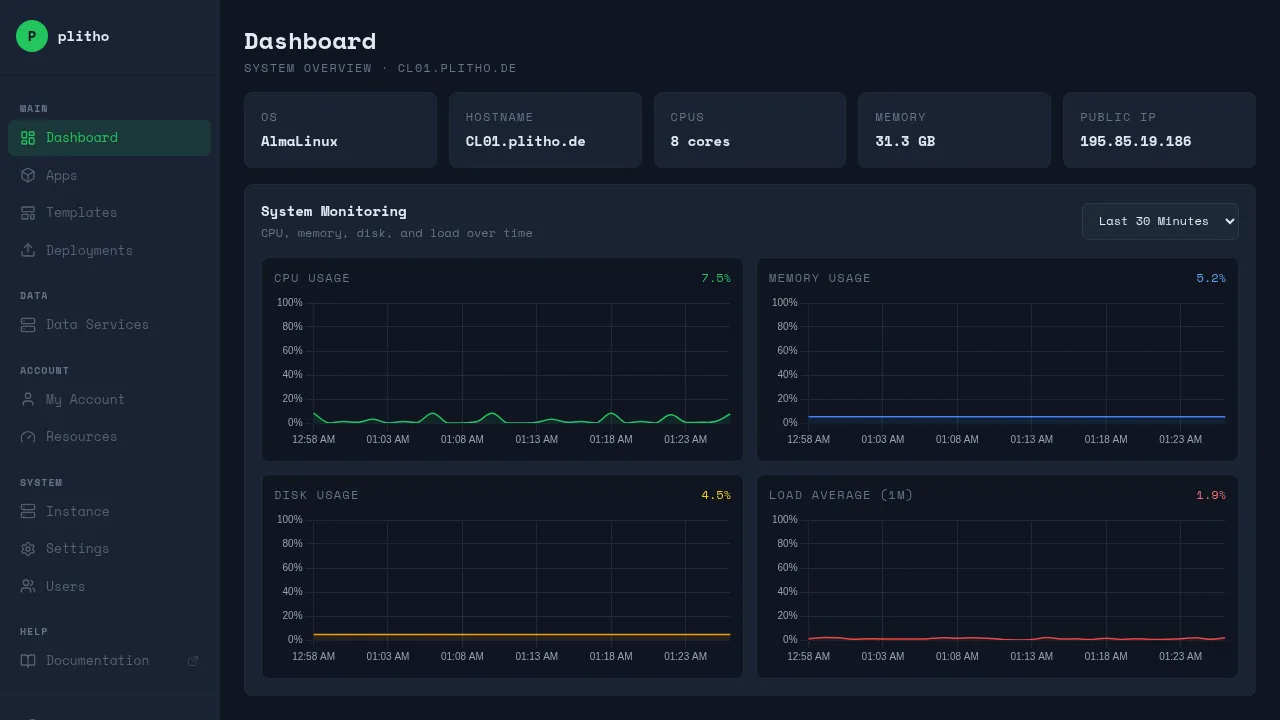
Accessing the Dashboard
Your server administrator will give you a dashboard URL and login credentials. Open it in your browser.

From the dashboard you can:
- Deploy and manage apps
- Create databases and cache instances
- Manage data services (NATS, MongoDB, RabbitMQ)
- View logs and metrics
- Manage SSH keys and users
- Monitor resource usage
Deploying Your First App
There are multiple ways to deploy. Pick whichever fits your workflow.
Option 1: Git Push (Recommended)
Best for source code (Node.js, Python). Push your repo and Plitho builds it.
# One-time setup
git remote add plitho ssh://plitho@your-server:2222/myapp

# Deploy
git push plitho main
Note
The SSH username is always plitho. Your identity is determined by your SSH key, not the username in the URL.
Option 2: CLI Deploy
Best for compiled binaries (Go, Rust, C) and built static sites. Build locally, deploy the artifact.
# Build
go build -o server .

# Deploy
plitho deploy --at your-server -y ./server
Option 3: Template Deploy
Best for known apps (PocketBase, TrailBase, FileBrowser). One click in the dashboard — no plitho.yml needed.
- Go to Templates in the dashboard
- Click INSTALL
- Done
Option 4: Tar Deploy
Stream a tarball directly via SSH. For custom pipelines and automation.
tar -cf - plitho.yml | gzip | ssh -p 2222 your-server "tar-deploy myapp --stream"
All methods require your SSH key to be added to Plitho. See SSH Keys.
Your App's Filesystem
When you deploy, Plitho creates a dedicated Linux user for your app (plitho-{appname}). You can SSH into it to see what's going on:
ssh -p 2222 plitho@your-server
Then switch to the app user:
sudo su - plitho-myapp
You'll find these directories:
| Directory | What's there | Survives deploys? |
|---|---|---|
/app |
Your git checkout or deployed files | No — reset on each deploy |
/data |
Persistent storage (uploads, SQLite DBs, caches) | Yes |
/env |
Dependencies (node_modules/, Python virtualenv/) |
No — rebuilt on each deploy |
/logs |
Process stdout/stderr output | Yes |
/app
Your code lives here. On each deploy, this is wiped and replaced with a fresh copy. Don't store anything here that you need to keep.
/data
Your persistent storage. This is yours — Plitho never touches it. Use it for:
- Uploaded files
- SQLite databases
- Any state that should survive a redeploy
Access it in your code as the current working directory, or read/write files here directly.
/env
Dependencies are installed here automatically:
- Node.js:
node_modules/ - Python:
virtualenv/
This is recreated on each deploy. You don't manage it — Plitho handles it.
/logs
Process output from your app. You can also view these in the dashboard (Apps → your app → Logs) or via SSH:
ssh -p 2222 plitho@your-server log myapp
Logs survive redeployments — you can always see what your app outputted.
What's Next
- Configuration — The
plitho.ymlreference - Deployment — All deployment methods in detail
- Features — Apps, databases, cache, templates
- SSH Keys — Set up git push and SSH access