Environment Variables
Set secrets and configuration for your apps. Environment variables are injected into your app process at startup.
Setting Environment Variables
Via plitho.yml
apps:
  - name: myapp
    env:
      NODE_ENV: production
      DATABASE_URL: postgres://user:pass@localhost:5432/mydb
      API_KEY: your-secret-key
Via the Dashboard
- Go to Apps → your app → Environment tab
- Add or edit variables
- Click Save
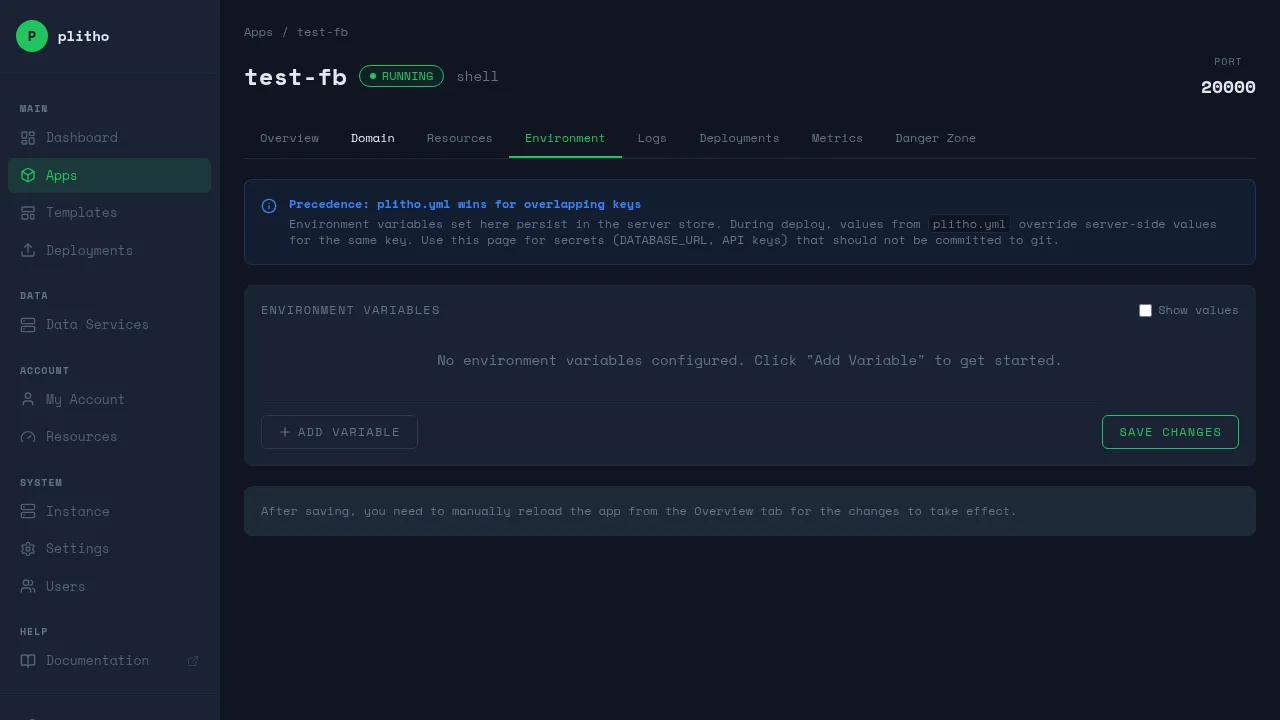
Changes require a restart — click Reload on the app.
How They Work
- Variables are stored securely in the Plitho database
- They persist across deploys and restarts
- Changes take effect after a restart
- The
PORTvariable is auto-set to yourserver_port— don't set it manually - The
BIND_ADDRESSis always set to0.0.0.0 - The
HOMEandDATA_DIRvariables are set to your app's directories
Common Variables
| Variable | Description | Example |
|---|---|---|
DATABASE_URL |
PostgreSQL connection string | postgres://user:pass@host:5432/db |
REDIS_URL |
Redis/Valkey connection string | redis://:pass@host:6379 |
PORT |
Auto-set by Plitho | 3000 |
BIND_ADDRESS |
Auto-set to 0.0.0.0 |
0.0.0.0 |
HOME |
App home directory | /home/plitho-myapp |
DATA_DIR |
Persistent data directory | /home/plitho-myapp/data |
NODE_ENV |
Node.js environment | production |
PYTHONUNBUFFERED |
Python output buffering | 1 |
SECRET_KEY |
App secret (Django, etc.) | your-secret-key |
VIRTUAL_ENV |
Python virtualenv path (auto-set) | /home/plitho-myapp/env |
PATH |
Includes virtualenv bin (auto-set) | /home/plitho-myapp/env/bin:... |
Note
Don't put secrets in plitho.yml if your repo is public. Use the dashboard to set sensitive variables instead — they're stored separately and not exposed in git history.
Warning
Environment variable values are sanitized for systemd unit files. Newlines and null characters are stripped. If you need multiline values, consider base64-encoding them.