Domains & SSL
Configure custom domains and automatic SSL certificates for your apps.
Custom Domains
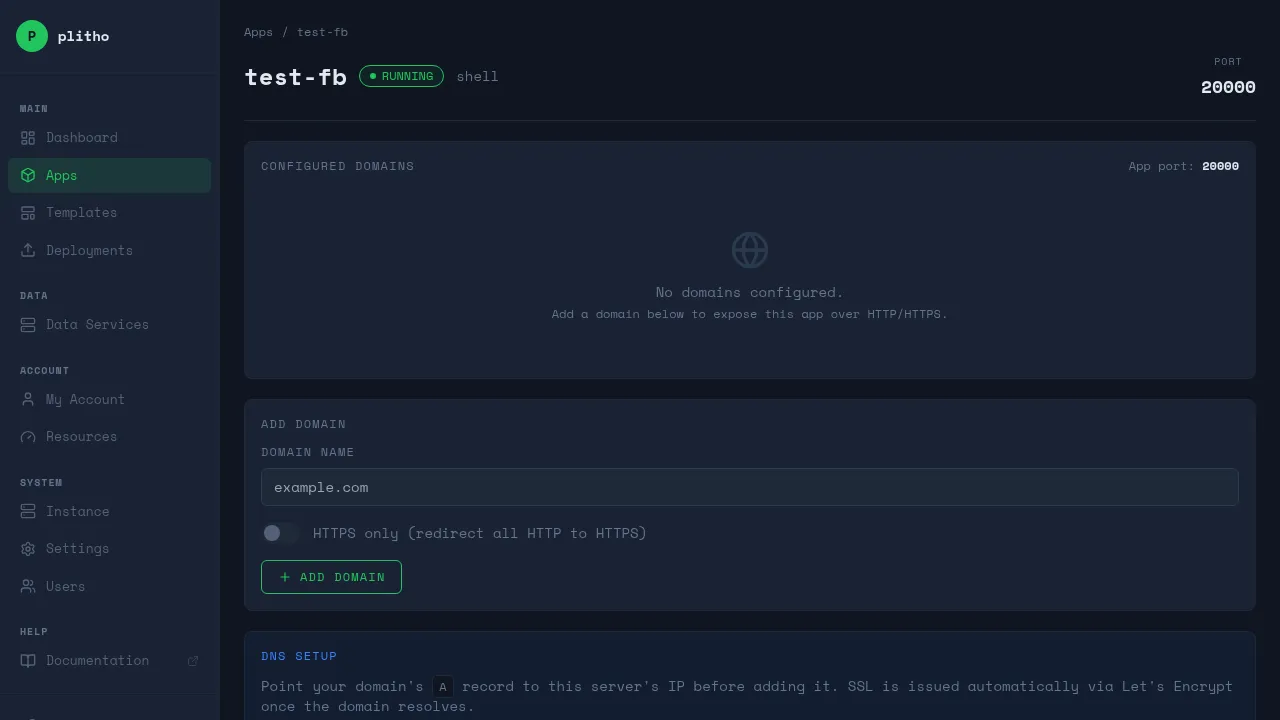
Setting a Domain
Set the domain through the Plitho dashboard:
- Go to Apps → your app → Domain tab
- Enter your domain (e.g.,
myapp.com) - Save
DNS Configuration
Point your domain to the server:
| Record Type | Name | Value |
|---|---|---|
| A | @ or myapp |
Server IP address |
| AAAA | @ or myapp |
Server IPv6 (if available) |
Auto-Generated Domains
If you set an Instance FQDN in Settings, Plitho automatically generates domains for all apps as <app>.<fqdn>. For example, if your FQDN is example.com, your app myapp gets myapp.example.com.
The control panel is available at cp.<fqdn>.
Adding Multiple Domains
Add extra domains via the dashboard:
- Go to Apps → your app → Domain tab
- Enter the additional domain
- Click Add Domain
Each domain gets its own SSL certificate.
IP-Based Deployment (No Domain)
If you don't set a domain, your app is accessible directly at http://your-server:PORT. No nginx proxy, no SSL.
SSL Certificates
Automatic SSL
Plitho automatically provisions SSL certificates via Let's Encrypt when you configure a domain. No manual setup required.
How It Works
- You set a domain in the dashboard
- Plitho generates an nginx config with SSL
- The agent requests a certificate from Let's Encrypt
- Certificate auto-renews before expiry
Resetting SSL
If you need to reissue a certificate:
- Go to Apps → your app → Domain tab
- Click Reset SSL
Or via SSH:
ssh -p 2222 plitho@your-server reset-ssl myapp
Nginx Configuration
Plitho generates nginx configs automatically for each app. You don't need to manage nginx yourself — Plitho handles it.
How Nginx Works
When you deploy an app with a domain:
- Plitho generates an nginx config for your app
- The config proxies requests to your app's port
- SSL is handled at the nginx level
- Your app only needs to listen on its
server_port
What Nginx Handles
- SSL termination — HTTPS is handled by nginx, not your app
- HTTP to HTTPS redirect — All HTTP traffic is redirected to HTTPS
- Gzip compression — Responses are compressed automatically
- WebSocket support — Upgrade headers are passed through
- Static file serving — For static runtimes, nginx serves files directly
- Security headers — Standard security headers are added
Custom Nginx Configuration
For advanced use cases, you can add extra nginx configuration using the nginx.include_file option in your plitho.yml:
apps:
  - name: myapp
    nginx:
      include_file: /etc/nginx/snippets/myapp.conf
This adds an include directive to the generated nginx config, letting you inject custom configuration without overriding Plitho's generated config.
What You Can Do With It
Custom headers:
# /etc/nginx/snippets/myapp.conf
proxy_set_header X-Custom-Header "my-value";
add_header X-Frame-Options "SAMEORIGIN";
Rate limiting:
# /etc/nginx/snippets/myapp.conf
limit_req zone=api burst=20 nodelay;
Custom error pages:
# /etc/nginx/snippets/myapp.conf
error_page 502 503 504 /50x.html;
location = /50x.html {
    root /usr/share/nginx/html;
}
WebSocket support:
# /etc/nginx/snippets/myapp.conf
proxy_http_version 1.1;
proxy_set_header Upgrade $http_upgrade;
proxy_set_header Connection "upgrade";
Request body size:
# /etc/nginx/snippets/myapp.conf
client_max_body_size 100M;
Note
The include_file path must be accessible by the agent (runs as root). Place custom configs in a location like /etc/nginx/snippets/.
Tip
Most apps don't need custom nginx config. Plitho's generated config handles SSL, proxying, and headers automatically. Only use include_file if you need something specific.
Troubleshooting
SSL not provisioning
- Make sure DNS points to the server
- Check that port 80 is open (needed for Let's Encrypt challenge)
- Check the agent logs if you have admin access
Mixed content warnings
If your app loads resources over HTTP while on HTTPS:
- Enable "Force HTTPS" in the dashboard (Apps → your app → Domain tab)
- Use relative URLs or
https://for all resource links
App not accessible without domain
If you haven't configured a domain, your app is only accessible via http://your-server:PORT. Configure a domain in the dashboard to enable nginx proxying and SSL.