Databases
Plitho manages PostgreSQL databases for you. Create, connect, and manage them from the dashboard.
Databases List
The Databases page shows all your PostgreSQL databases.
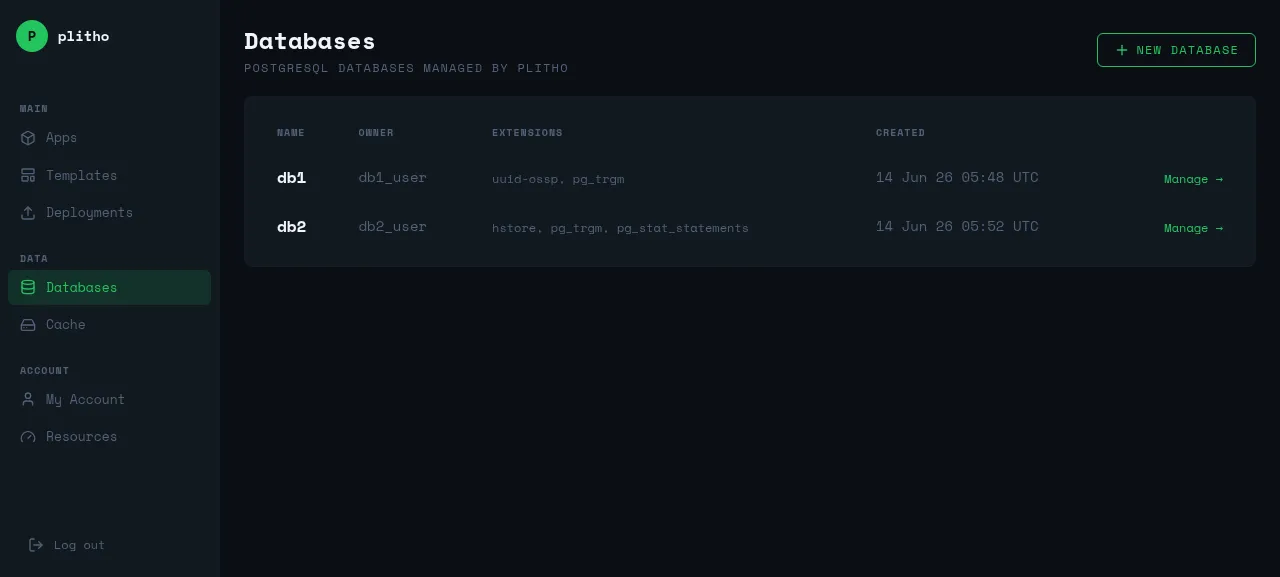
| Column | Description |
|---|---|
| Name | Database name |
| Owner | Database user |
| Extensions | Installed PostgreSQL extensions |
| Created | When the database was created |
Creating a Database
- Go to Databases → NEW DATABASE
- Enter a name
- Click CREATE DATABASE
Plitho creates the database, a user with a generated password, and stores the credentials.
Connecting to a Database
Connection String
Plitho gives you a connection string:
postgres://db_user:password@localhost:5432/db_name
From Your App
Add it as an environment variable:
- Go to your app → Environment tab
- Add
DATABASE_URLwith the connection string - Restart your app
const { Pool } = require('pg');
const pool = new Pool({ connectionString: process.env.DATABASE_URL });

const result = await pool.query('SELECT NOW()');
# settings.py
DATABASES = {
    'default': {
        'ENGINE': 'django.db.backends.postgresql',
        'NAME': 'db_name',
        'USER': 'db_user',
        'PASSWORD': 'password',
        'HOST': 'localhost',
        'PORT': '5432',
    }
}
Or use DATABASE_URL with dj-database-url:
import dj_database_url
DATABASES = {
    'default': dj_database_url.config(default=os.environ['DATABASE_URL'])
}
import os
import psycopg2

conn = psycopg2.connect(os.environ['DATABASE_URL'])
import (
    "database/sql"
    _ "github.com/lib/pq"
)

db, err := sql.Open("postgres", os.Getenv("DATABASE_URL"))
From Your Machine
Connect directly if the port is open:
psql "postgres://db_user:password@localhost:5432/db_name"
Extensions
PostgreSQL extensions add extra functionality.
Adding Extensions
- Go to Databases → click on a database
- Enter the extension name
- Click Add
Common Extensions
| Extension | Purpose |
|---|---|
uuid-ossp |
UUID generation |
pg_trgm |
Fuzzy text search |
hstore |
Key-value store |
pg_stat_statements |
Query performance tracking |
postgis |
Geospatial data |
pgcrypto |
Cryptographic functions |
Resetting Password
- Go to Databases → click on a database
- Click Reset Password
- Update
DATABASE_URLin your app's environment variables
Dropping a Database
Danger
This permanently deletes the database and all its data.
- Go to Databases → click on a database
- Click Delete
- Confirm
Best Practices
- Use one database per app
- Back up your databases regularly (Plitho doesn't handle backups automatically)
- Use connection pooling for high-traffic apps
- Store the connection string in environment variables, not in code